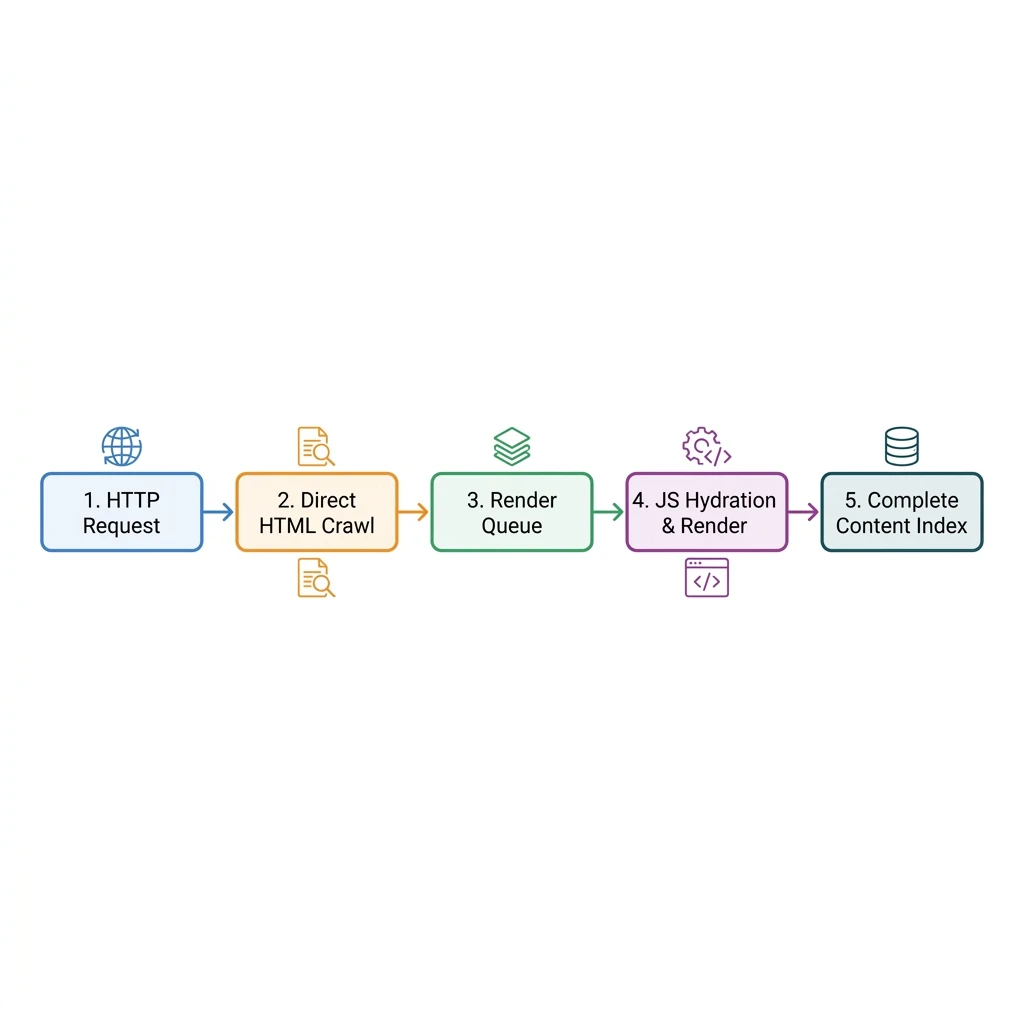
Google's indexing process for client-rendered JavaScript applications runs in two stages, delaying the indexation of dynamic text elements by up to three weeks while waiting for browser emulation resources. By pre-rendering your page templates into static HTML assets, you ensure search crawlers access and index your content instantly.
Single Page Applications (SPAs) built with React are popular for their fast, fluid user experiences. However,
because they render content on the client side using JavaScript, they present unique challenges for SEO. When
a search engine bot requests a standard client-rendered React site, it receives a blank HTML document
containing a <div id="root"></div> and a script bundle. If the bot does not run the
JavaScript, the page appears empty, resulting in poor search rankings.
1. The Two-Wave Indexing Bottleneck
Google crawls and indexes websites using a two-stage process. During the first stage, the crawler parses the static HTML to extract links and build an initial index. If the page is an empty client-rendered shell, Google puts it in a queue for the Web Rendering Service (WRS). WRS renders the page using a headless browser to execute the JavaScript, but this rendering queue can delay indexation by weeks.
To prevent this delay, you must serve fully rendered HTML directly from your server. We have three main rendering options:
- Server-Side Rendering (SSR): Renders pages on the server for each request. Ideal for highly dynamic sites, but increases hosting costs and server load times.
- Static Site Generation (SSG): Compiles React components into static HTML files during the build build step. Recommended for blogs and marketing portfolios because files can be served instantly from global edge networks.
- Pre-rendering: Captures rendered HTML at build time using a headless browser. A lightweight alternative to full SSG setups.
2. Configuring Dynamic Meta Tags in React
To rank in search results, every page needs unique title and description tags. Since React updates these tags
dynamically in the browser, you need to configure your components to update metadata safely without memory
leaks. We recommend using the react-helmet-async library:
import React from 'react';
import { Helmet, HelmetProvider } from 'react-helmet-async';

interface SEOProps {
  title: string;
  description: string;
  slug: string;
}

export const SEO: React.FC<SEOProps> = ({ title, description, slug }) => {
  const canonicalUrl = `https://www.pizzascript.com/blog/${slug}`;

  return (
    <HelmetProvider>
      <Helmet>
        <title>{title}</title>
        <meta name="description" content={description} />
        <link rel="canonical" href={canonicalUrl} />
        <meta property="og:title" content={title} />
        <meta property="og:description" content={description} />
        <meta property="og:url" content={canonicalUrl} />
      </Helmet>
    </HelmetProvider>
  );
};
Using react-helmet-async ensures that metadata updates are thread-safe and won't conflict during
concurrent route changes. When paired with pre-rendering tools, these tags are compiled directly into the
static HTML files, making them immediately readable by search bots.
3. Handling Routing and Status Codes
Client-side routing (like react-router-dom) presents another challenge: when a user requests a
route that does not exist, the router renders a 404 component, but the server still returns a 200 success
status code. Search engines index these "soft 404" pages, which can dilute your domain authority.
To resolve this, configure your hosting provider (Vercel, Cloudflare, Netlify) to rewrite routing requests to
the entry point (index.html) and manage status codes at the edge:
// vercel.json rewrite configuration to support client-side routing
{
  "rewrites": [
    { "source": "/(.*)", "destination": "/index.html" }
  ]
}
Technical SEO Checklist for React SPAs
- Serve pre-rendered static HTML rather than a blank
#rootshell. - Validate your schema data structure using Google's Rich Results Test.
- Implement clean navigation links (
<a href="/blog">) instead of click handlers to help crawlers discover your content.
4. Measuring SEO Success
To monitor your site's indexability, check Google Search Console regularly. Compare the "URL Inspection" live test results with the indexed version to confirm Google parses your JavaScript content correctly. Inspecting sitemap performance is also key; see how we used dynamic sitemaps to optimize search crawls in our My Design Academia Case Study.
If you need to optimize your website's search engine visibility, we can help. Learn more about our technical approach on our SEO-Friendly Website Engineering Service page, or reach out to our team to request a search indexation audit.